Call 1300 885 420 or +61 444 532 161
iTandCoffee | Patient help with your personal and business technology
  • Home
  • About
    • About iTandCoffee
    • In the media
    • Testimonials >
      • Testimonials 2020-21
      • Testimonials 2019
      • Testimonials 2018
    • Privacy Policy
    • Other Policies
    • Prices
  • Classes
    • What's On
  • Appointments
  • Books | Videos | Tips
    • Books
    • Videos
    • Blog
    • Newsletter
    • Tips Library
  • Gift Vouchers
  • iTandCoffee Club
    • Members Area
    • About the Club
    • Membership Options
  • Store
  • Contact
  • Home
  • About
    • About iTandCoffee
    • In the media
    • Testimonials >
      • Testimonials 2020-21
      • Testimonials 2019
      • Testimonials 2018
    • Privacy Policy
    • Other Policies
    • Prices
  • Classes
    • What's On
  • Appointments
  • Books | Videos | Tips
    • Books
    • Videos
    • Blog
    • Newsletter
    • Tips Library
  • Gift Vouchers
  • iTandCoffee Club
    • Members Area
    • About the Club
    • Membership Options
  • Store
  • Contact
Search by typing & pressing enter

YOUR CART

Handy Hint Blog
iTandCoffee Handy Hints up to Sept 2014

22/8/2014 0 Comments

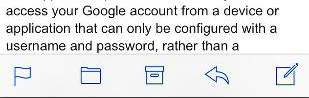
Handy Hint 64:  Where has my trash can gone for my Gmail Mail?

Have you wondered why you don't seem to have a trash can for your Gmail emails on your iPad and/or iPhone - why you instead have a strange 'box' symbol??

Picture
Picture
Picture
Picture
0 Comments

22/8/2014 0 Comments

Handy Hint 63: How do I stop the kids games from appearing on my iPad and iPhone?

If you share an iTunes account with your family, and in particular your kids, it can be really annoying to have all their games automatically appearing on your device/s!  But how do you stop this from happening?

Picture
0 Comments

20/8/2014 0 Comments

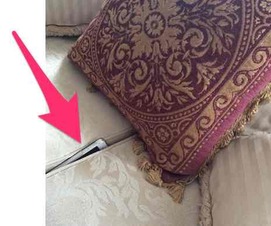
Handy Hint 61 - How can I find my misplaced iPad or iPhone when it is muted!?

This is something I frequently need to do.  I have my phone on mute after an appointment, and then put it down somewhere and can't find it!  No point calling it - because its muted, so won't ring!

So, how do I find it when this happens?
Picture
Picture
0 Comments

28/6/2014 0 Comments

Handy Hint 52 - Saving PDF's to your iPad or iPhone

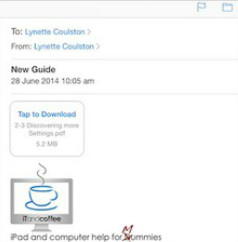
Ever wondered if there is a way to save to your iPad the PDF files that you receive in emails, messages and open in Safari?

For those of you who have downloaded copies of the iTandCoffee guides, this video shows how you can easily import them into your iBooks app so that you can read them at any time in future.
Picture
Picture
0 Comments

21/6/2014 0 Comments

Handy Hint 50 - Restricting what websites kids can see on i-Devices

How do you protect kids and stop them from accidentally or deliberately accessing inappropriate content on the internet from their i-Devices, while still giving them the ability to access age-appropriate content for school and entertainment?
Picture
Picture
0 Comments

14/6/2014 0 Comments

Handy Hint 49 - Some tips for using Maps

In this handy hint video, we look at a couple features of Maps - how to find your currently location very quickly, and how to change from normal (map) view to the different 'satellite' views.

For those who prefer Google Maps to Apple's maps, we also look at how to do the same things in that app!
Picture
Picture
0 Comments

5/6/2014 0 Comments

Is your iPad (or iPhone) storing away all your Passwords for anyone to see?

Picture
Now, you know that iTea&Coffee highly recommends that you set a Passcode Lock on your device.  Even better, try to use a 'non-simple' passcode - not just the 4-digit code, but something a bit longer and more complex.

However, if you choose to NOT set a Passcode Lock on your device, you need to be aware that you may be leaving the door open to someone accessing your account logins and passwords really, really easily.

Did you know that, depending on your Settingsfor your Safari app, your device may be saving away your logins and passwords for all the sites that you access when your are using Safari?

Why not check out if this is happening on your device.

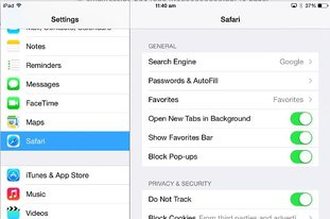
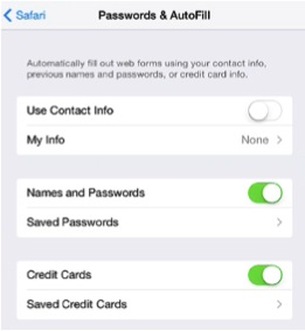
Go to Settings -> Safari -> Passwords and AutoFill.

Is Names and Passwords switched to On (green) as it is in the leftmost image below?  
Picture
Picture
Picture
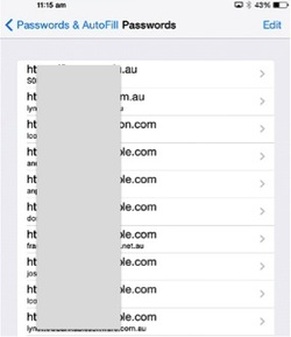
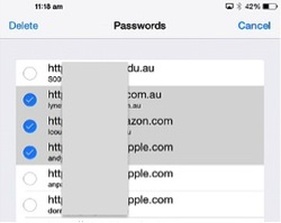
If it is ‘On’, touch on Saved Passwords to see the list of already saved website logins and password (example shown above right).  You will see that you can touch on any item in this list to view the password associated with the website!  (If you do have a passcode set, you will need to enter this before you will be able to view the password.)

There will be some websites (e.g. Banking websites) that will not allow your 'login credentials' to be saved in you list of Safari passwords - for example, my Commbank login details are not saved here.

Please, really need think about whether you want to Safari to be saving your Passwords.  
Turn the Names and Passwords setting to Off if you don't want these details saved or if you don't want to set a Passcode Lock on your device.  But if you do want to save these passwords here, please make sure you have a very strong Passcode for your device!

If you have details already in this list of saved passwords that you wish to now remove, you can delete some or all of them by Choosing Edit at top right of the list of websites, then touch each item in the list that you want to delete to ‘tick’ these items.  Then choose Delete at top left to remove the select items from the list.

Another important warning on this one!

Anyone who uses your iPad or iPhone to visit websites and log in with their on login/password details may be inadvertently saving their passwords to your device!  Same applies if you use someone else's device - you may be saving your private information to their device!  

Need further advice or assistance?

Contact iTea&Coffee on 1300 885 420 or email [email protected].

0 Comments

8/5/2014 0 Comments

Handy Hint 44 - Navigating when on Safari!

In this Handy Hint, we look at some new ways that you can move between web pages in Safari - which are much easier than touching on the < and > at the top left of each page.  

You will also see how you can also quicky return to a page that you visited recently - even if it was several pages back in your 'journey' on Safari!

Watch the video or read about this feature by clicking on the below button.  

Picture
0 Comments

9/4/2014 0 Comments

Handy Hint 43: Solving iMessage Woes

Has your iMessage been mis-behaving since the upgrade to iOS 7 or 7.1 - or perhaps never quite worked properly.  Is it sometimes only sending message to one of your devices, not both - even though you have registered both your phone number and email address against your Apple ID?  Is it showing up as coming up from your email address instead of your phone number? 

This can be very, very frustrating!

Watch it now to find out how to resolve this problem.
Are you confused about iMessage - or is your iMessage confused?

If you are not sure about how to set up your devices so that you can receive and send your iMessages from both your iPad and iPhone; or if perhaps you are getting each others' messages on the wrong device/s, iTea&Coffee can help.

Make an appointment by contacting [email protected] (we are in Camberwell, Melbourne) or call on 1300 885 420.
Picture
Picture
0 Comments

2/4/2014 0 Comments

Handy Hint 39 - Getting rid of annoying notifications

Picture
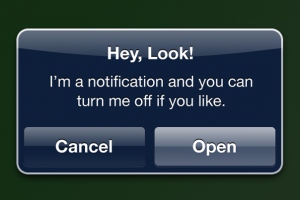
Are you sick of those annoying messages that pop up on your iPhone or iPad's screens, especially those from the kids' games and apps that you have on your device?  Find out how to control what apps are allowed to show such messages!
Picture
0 Comments
<<Previous
Forward>>

    Join the
    iTandCoffee Club today!


    This page provides a compilation of the Handy Hint tips and tricks published up until September 2014

    Archives

    December 2016
    September 2014
    August 2014
    July 2014
    June 2014
    May 2014
    April 2014
    March 2014
    February 2014
    January 2014
    December 2013
    November 2013
    October 2013
    September 2013
    August 2013

    Categories

    All 3G 4G Airdrop Airplay Apple Tv Apps App Store Attachments Calendar Camera App Cellular Computer Contacts Cybersafety Data Document Download Earphones Email Facebook Facetime Find My Iphone Gmail Google Handy Hint Hidden Keys Housekeeping Ibooks Icloud Imessage Internet Ios 6 Ios 7 Ipad Iphone Ipod Itunes Keyboard Kids Lock Screen Mac Mail Maps Mavericks Media Controls Message Messages Multi Tasking Music Navigation Notifications Os X Passcode Passwords PDF Penultimate Phone Phone App Photos Photos App Prepaid Print Recharge Reminders Restrictions Rings Safari Screen Searching Security Settings Sharing Shortcuts Sim Siri Sounds Spotlight Storage Space Store Telstra Typing Usage Voicemail Windows

​​Call  +61 444 532 161  or  1300 885 420

​to book an appointment or class, or to enquire about our services and products


Seniors Card Welcome
SENIORS CARD WELCOME HERE:
Seniors Card holders qualify for a 10%* discount on eligible classes booked and paid for online. 
To activate the discount at the time of booking, select Redeem Coupon or Gift Certificate and enter 10OFFSEN before selecting Pay Now
Seniors can also save $5** on the first full hour of appointments booked online. Enter Coupon Code of 
BASEN5 when booking to receive this discount.
* Some heavily discounted classes are excluded from the 10% class discount offer.
** Where more than one type of discount is available, only one type of discount can be used.

Services
Classes
Event Calendar
Private Appointments
Gift Vouchers
Remote support
​Business Services
​Help for families

Online Content
​Newsletter
User Guides
Video tutorials/classes
Tips and Hints
​Blog
iTandCoffee Club
About the Club
Free Club Sessions
Sign In/View Account
Members Area
Prices/Policies
Prices
Privacy
Cancellations, Refunds, Returns
About iTandCoffee
Home
About

​Contact us
Testimonials
In the press

Picture
​© 2012-2026 iTandCoffee Pty Ltd. All rights reserved  ACN: 606 340 434