Call 1300 885 420 or +61 444 532 161
iTandCoffee | Patient help with your personal and business technology
  • Home
  • About
    • About iTandCoffee
    • In the media
    • Testimonials >
      • Testimonials 2020-21
      • Testimonials 2019
      • Testimonials 2018
    • Privacy Policy
    • Other Policies
    • Prices
  • Classes
    • What's On
  • Appointments
  • Books | Videos | Tips
    • Books
    • Videos
    • Blog
    • Newsletter
    • Tips Library
  • Gift Vouchers
  • iTandCoffee Club
    • Members Area
    • About the Club
    • Membership Options
  • Store
  • Contact
  • Home
  • About
    • About iTandCoffee
    • In the media
    • Testimonials >
      • Testimonials 2020-21
      • Testimonials 2019
      • Testimonials 2018
    • Privacy Policy
    • Other Policies
    • Prices
  • Classes
    • What's On
  • Appointments
  • Books | Videos | Tips
    • Books
    • Videos
    • Blog
    • Newsletter
    • Tips Library
  • Gift Vouchers
  • iTandCoffee Club
    • Members Area
    • About the Club
    • Membership Options
  • Store
  • Contact
Search by typing & pressing enter

YOUR CART

Tips, Tricks and News 
about all sorts of technology in your life!

5/6/2015 0 Comments

Editing can turn ordinary photos into something really special

During our time away in Europe recently, my iPhone 6 Plus was my one and only camera.  And I was so happy with how it performed!  

As you can imagine, I snapped a very large number of photos - some good, some not so good.

But what I loved doing during our 'downtime' while travelling was to go through these photos and use various editing features provided by my iPhone to change the fairly ordinary photos into something a lot more special. 

In some cases, this just meant improving the lighting a bit. cropping or slightly rotating the photo.  For others, it mean using more advanced editing tools to improve the detail shown in indoor or outdoor photos that had poor lighting. Sometimes the difference was just amazing!  

Below is just one photo (of Salisbury Cathedral) that was a bit dark.  Look at how a quick edit made this photo look almost like a painting and brought out some great effects in the clouds.
Picture
Picture
In the below photo, a quick edit helped to bring out the detail in a photo of the beautiful wall and ceiling murals at Hampton Court.
Picture
Picture
And it was so easy to do!

For those of you interested in learning how to use your iPhone/iPad to create better photos, I will soon be scheduling a special workshop on this topic.  It will go beyond just the basics of taking of managing photos on your iPad and iPhone, delving into the built-in editing features of your device as well as looking at some apps that can provide even more editing features.  We'll talk about iCloud Photo Sharing, iCloud Photo Library, Photo Stream and more.

To register your interest in attending this workshop, click/tap here.

For those of you with an interest in reading up on 'iPhoneography' (or 'iPadography') - taking great photos with your iPad and iPhone - here are some recently published articles on this topic.

  • 8 Quick Tips For Taking Stunning Silhouette iPhone Photos
  • 11 Tips For Taking Beautiful iPhone Photos Of Nature
  • 16 Simple Tips For Flawless Travel Photography
  • How to Straighten Photos on iPhone & iPad
  • iPhone Photography Tips for Getting a Great Picture
  • 10 Tips for iPhone Night Photography
  • Pixelmator expands to iPhone
0 Comments

5/6/2015 2 Comments

An excellent article on how to ensure your security on Mac and iPhone/iPad

Macworld recently published the below article about online safety on Apple devices.  It is really worth a read - don't think that theft of your device or online data can't happen to you!

If you need any assistance with understanding or putting in place any of the suggested security measures, just call iTandCoffee on 1300 885 420 or email [email protected].
Ensuring your safety - The Mac and iOS Security Guide - Macworld Australia
Picture
2 Comments

5/6/2015 0 Comments

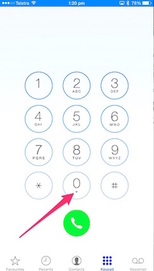
iPhone tip: How to dial an overseas number that has a '+' at the start

Picture
If you even find that you need to dial an overseas number that starts with a + (for example, +61 to dial Australia), you may find yourself staring at your iPhone's keypad wondering how to key the required '+'.

You will notice that that the keypad has a small '+' symbol underneath the zero.  

To select this '+', touch and hold on the zero key for a second or so. 

A zero will show initially, but if you keep holding on the zero key, you will see the zero change to a '+'.

Then, just type the rest of your overseas number and tap the green button to dial.


0 Comments

5/6/2015 0 Comments

This week's iPad and iPhone handy hint: Some very handy tips about your device's keyboard

Over the past couple years, iTandCoffee has posted various tips about keyboard on your iPad and iPhone, describing some features that you might not have previously discovered. 

To celebrate the return of the iTandCoffee Handy Hint Newsletter after more than 4 weeks' break, here is a handy reference to those past tips.

For those of you who have been receiving the iTandCoffee newsletter for a while, the below tips hopefully offer a quick refresher on some features that you may have forgotten.
Picture
Handy Hint 1:  Hidden keys on iPhone/iPad keyboard
Have you ever wondered how to quickly access symbols like £ and ¢ on your iPad and iPhone keyboard?  Or how you can include a º sign when describing the temperature?  

Handy Hint 19 - Strange keyboard behaviour on your iPad
Ever had a split keyboard on your iPad? Or found your keyboard is in the middle of the screen when you want it to be down the bottom? Or simply wanted that keyboard to go away so you can see what's hidden underneath it?  

Handy Hint 24:  Oops - I didn't mean to delete that!  How to undo.
Have you ever deleted an email or a piece of text and thought 'OOPS' (or some other expletive), and bemoaned that you can't 'undo' your action on your iPad/iPhone?  Well there IS a way to undo your last action.   

Handy Hint 89 - Have you found the Caps Lock on your iPad and iPhone's keyboard?
Do you know how to type a whole word or sentence in capital letters without having to tap the 'Shift' key each time you type a letter?  Find out in this Handy Hint.
Do you want to learn more about your iPad or iPhone so that you can really take advantage of its amazing features?  

Why not attend our 'Introduction to the iPad and iPhone' class series, running in June and July 2015.  Click here for more details and dates for this class series.

0 Comments

4/6/2015 0 Comments

Are you coming to an 'iTandCoffee meets Thermomix' lunch?

Picture
Have you registered for one of the iTandCoffee meets Thermomix lunches scheduled in July and August 2015?  

Both advertised classes are filling fast, so if you would like to come along but haven't yet specified which date you would like to attend, click/tap here to make your selection. 

The two dates currently on offer are:
  • Friday July 17th 2015, 11am-2pm
  • Friday 7th August 2015, 11am - 2pm

(If Fridays don't work for you, please let us know what days suit you, and we will try to find a date that fits.)

Looking forward to seeing those who register for these lunches in July!!

0 Comments

4/6/2015 0 Comments

Book now for an iTandCoffee class in June & July 2015

Picture
Here's the latest schedule of the iTandCoffee classes for June and July, showing only those for which there are still spaces available.  Book now to avoid missing out on these remaining classes.

Select 'MORE >>' to view further details or to book, or call iTandCoffee on 1300 885 420.

Class Name

Who's it for?

When is it on?

Introduction to the iPad and iPhone
(5 x 2-hour classes)

Beginners, seniors, those who want a slower pace and learn about all the key aspect of their iPad and/or iPhone

From Wednesday June 10th, 11am-1pm
From Tuesday July 14thth, 1-3pm
MORE >>

Getting to know your Mac
(4 x 2-hour classes)

For those who have a Mac computer and want to discover its great features.

From Thursday July 16th, 9:30-11:30am
MORE >>

Bring your busy life under control using your iPad and iPhone
(2 x 2-hour classes)

For busy Mums (and others) who want to use their iPad/iPhone to get more organised and under control.

From Monday 20th July, 1-3pm
MORE >>

Introduction to Evernote
(1 x 2 hour class)

For those who want to learn about this great App, one that allows you take control of the information in your life, in a way that is so much more manageable.

Wednesday July 22nd, 1-3pm
MORE >>

Make a Photo Book
(1 x 2-hour classes)

For those with a laptop, desktop or Mac, who would like to create a digital photo book

Friday June 19th, 1-3pm
Wednesday 15th July 15th, 1-3pm
MORE >>

Travel and your iPad/iPhone (and other technology!)
(1 x 2 hour class)

For those who are interested in travelling with mobile devices: keeping in touch, keeping safe online, sharing photos, great tools for planning, accessing important information while away, finding your way around, etc.

Thursday June 11th, 7:30-9:30pm
Monday June 15th, 1-3pm
Friday July 25th, 9:30-11:30am
MORE >>

Introduction to iCloud
(1 x 2-hour classes)

Unravel the glorious mystery that is iCloud: what is it, what does it do, is it safe, how use it, how to control what goes into it.

Thursday June 11th, 9:30-11:30am
Wednesday July 29th, 1-3pm
MORE >>

Understanding and Using Dropbox
(1 x 2 hour class)

For those who would like to learn how to share their files between all their devices: their computer, iPad, iPhone, Android device, etc. Always have access to all your important information no matter which device you are using, while keeping this information safe in the cloud. Great for students!

Friday June 26th, 9:30-11:30am
Thursday July 16th, 7:30-9:30pm
MORE >>

iTandCoffee meets Thermomix (iTandLunch)
(1 x 3-hour lunch time class)

For those who would like to learn about some great tips for using your iPad and iPhone, while seeing some great food prepared using a the amazing new Thermomix - which now incorporates a touch screen and digital recipes!  Not only will you learn some great tech-tips, you will also get lunch!

Friday July 17th, 11am-2pm
Friday August 7th, 11am-2pm
MORE >>

NEW:  Evernote Users Group
(1 hour meeting)

For Evernote users who would like to learn more, ask questions and pick up great new tips for using their Evernote.  Share your love of Evernote with other Evernote users!

Monday June 22nd, 2-3pm
MORE >>

NEW:  Mac Users Group
(
1 hour meeting)

For Mac users, especially those who have already attended the Getting to Know your Mac series of classes. Come along with your list of questions!

Tuesday June 23rd, 7:30-9:30pm
MORE >>


0 Comments

3/6/2015 0 Comments

For those who prefer to see a calendar of classes ...

Here is an updated version of the calendar of classes for June and July, Fully booked classes for June have been removed from the previously published calendar.  

Future months will be scheduled soon.  
Picture

June 2015

Monday

Tuesday

Wednesday

Thursday

Friday

June 1

No Classes

June 2

No Classes

June 3

No Classes

June 4

No Classes

June 5

No Classes

June 8

Labour Day

No Classes

June 9

June 10

11:00am-1:00pm
Introduction to the iPad & iPhone (1)

June 11

9:30-11:30am
Introduction to iCloud

7:30-9:30pm
Travel with your iPad and iPhone

June 12

June 15

1:00-3:00pm
Travel with your iPad and iPhone

June 16

June 17

11:00am-1:00pm
Introduction to the iPad & iPhone (2)

June 18

June 19

1:00-3:00pm
Make a Digital Photo Book

June 22


June 23

7:30-9:30pm
Mac Users Group

June 24

11:00am-1:00pm
Introduction to the iPad & iPhone (3)

June 25


June 26

9:30-11:30am
Understanding and Using Dropbox

June 29

School Holidays

June 30

School Holidays

July 1

School Holidays

See July calendar

July 2

School Holidays

See July calendar

July 3

School Holidays

See July calendar


July 2015

Monday

Tuesday

Wednesday

Thursday

Friday

June 29

School Holidays

See June calendar

June 30

School Holidays

See June calendar

July 1

School Holidays

11am-1pm
Introduction to the iPad & iPhone (4)

July 2

School Holidays


July 3

School Holidays


July 6

School Holidays


July 7

School Holidays


July 8

School Holidays

11am-1pm
Introduction to the iPad & iPhone (5)

July 9

School Holidays


July 10

School Holidays

July 13

No Classes

July 14

4:00-5:00pm
Let`s Talk About
The Cloud

(Cameron Close)

July 15

1:00-3:00pm
Make a Digital Photo Book

July 16

9:30-11:30am
Getting to know your Mac (1)

7:30-9:30pm
Understanding and Using Dropbox

July 17

11:00am-2:00pm
iTandCoffee Meets Thermomix Lunch

July 20

1:00-3:00pm
Bring your Busy Life Under Control


July 21

9:30-11:30am
Introduction to the iPad & iPhone (1)


July 22

1:00-3:00pm
An Organised Life with Evernote


July 23

9:30-1130am
Getting to know your Mac (2)


July 24

9:30-11:30am
Travel with your iPad and iPhone

July 27

1:00-3:00pm
Bring your Busy Life Under Control


July 28

9:30-11:30am
Introduction to the iPad & iPhone (2)
(continues on
August 4, 11, 18)

July 29

1:00-3:00pm
Introduction to iCloud

July 30

9:30-11:30am
Getting to know your Mac (3)
(continues on
August 6)

July 31

No Classes


Here's the schedule of classes on the calendar for June and July.  Select any of the class links to visit the detail/booking page for that class.
0 Comments
Forward>>

    Receive great articles like this 
    fortnightly to your Inbox

    Picture

    Follow us on Facebook

    iTandCoffee

    Picture

    Join the iTandCoffee Club

    ​for free content, tutorials, videos, classes, offers, discounts and more

    Join our growing community of local and online members who love learning about their technology - through FREE club sessions, remote/phone support, online tips, tricks and tutorials, special members-only offers and discounts, and more. Membership starts at only $49/year.
    Find out more about The iTandCoffee Club

    What's on at iTandCoffee ?

    Below is our list of videos, classes and other events that are coming up soon.
    ​Videos shown are offered for eligible members of the iTandCoffee Club.
    If you have questions, why not join fun and informative 'user group' meetings, held once a month.
    All iTandCoffee classes are run as online classes (using Zoom), which means you can attend from anywhere.

    Archives

    April 2026
    March 2026
    February 2026
    January 2026
    December 2025
    November 2025
    October 2025
    September 2025
    August 2025
    July 2025
    May 2025
    April 2025
    March 2025
    February 2025
    December 2024
    November 2024
    October 2024
    September 2024
    August 2024
    July 2024
    June 2024
    May 2024
    April 2024
    March 2024
    February 2024
    January 2024
    December 2023
    November 2023
    October 2023
    September 2023
    August 2023
    July 2023
    June 2023
    May 2023
    April 2023
    March 2023
    February 2023
    January 2023
    December 2022
    November 2022
    October 2022
    September 2022
    August 2022
    July 2022
    June 2022
    May 2022
    April 2022
    March 2022
    February 2022
    January 2022
    December 2021
    November 2021
    October 2021
    September 2021
    August 2021
    July 2021
    June 2021
    May 2021
    April 2021
    March 2021
    February 2021
    January 2021
    December 2020
    November 2020
    October 2020
    September 2020
    August 2020
    July 2020
    June 2020
    May 2020
    April 2020
    March 2020
    February 2020
    January 2020
    December 2019
    November 2019
    October 2019
    September 2019
    August 2019
    July 2019
    June 2019
    May 2019
    April 2019
    March 2019
    February 2019
    January 2019
    December 2018
    November 2018
    October 2018
    September 2018
    August 2018
    July 2018
    June 2018
    May 2018
    April 2018
    March 2018
    February 2018
    January 2018
    December 2017
    November 2017
    October 2017
    September 2017
    August 2017
    July 2017
    June 2017
    May 2017
    April 2017
    March 2017
    February 2017
    January 2017
    December 2016
    November 2016
    October 2016
    September 2016
    August 2016
    July 2016
    June 2016
    May 2016
    April 2016
    March 2016
    February 2016
    January 2016
    December 2015
    November 2015
    October 2015
    September 2015
    August 2015
    July 2015
    June 2015
    May 2015
    April 2015
    March 2015
    February 2015
    January 2015
    December 2014
    November 2014
    October 2014
    September 2014
    August 2014
    July 2014
    June 2014
    May 2014
    April 2014
    March 2014
    February 2014
    January 2014
    December 2013
    November 2013
    October 2013
    September 2013
    August 2013
    July 2013
    June 2013
    May 2013
    April 2013
    March 2013
    February 2013
    January 2013
    November 2012
    October 2012
    September 2012
    August 2012
    May 2012

    Categories

    All 1800-number Accessibility Accessories Activity Monitor Adobe Adware AI Airdrop Airplay Airpods Alarms Alerts Android Apple Account Apple Id Apple-id Appleid.apple.com Apple Music Apple News Apple Pay Apple Pencil Apple Tv Apple Watch Apps App Specific Passwords App Store App Windows Apss Audio Autolock Automatic-downloadsupdates Automator Backup Backups Battery Be-connected Be-connected Bigpond Big Sur Bitcoin Bitlocker Blockchain Bluetooth Booklet Books Boot Camp Budgetting Business Buying Guide Calendar Camera Canva Captcha Catalina Cellular Data Centrelink Channel 9 Charging ChatGPT Christmas Chrome Classes Client Stories Clipboard Cloud Cloud-storage Cloud-storage Club Club News Colours Com Compass Contacts Continuity Control-center Control Centre Convert Cookies Copilot COVID COVID 19 COVID-19 Cybersafety Datad777f385d3 Data Usage Delete Desktop Dictation Dock Do Not Disturb Downloads Dropbox DVD Education El-capitan Email Emergency Emojii Encryption Entertainment ESIM Ethernet Evernote Excel Facebook Family Family History Files Finance Finder Find My Find My Car Find-my-iDevice Fingerprint Sensor Fonts Force Reboot Forgetting Curve Fraud Free Friday Gift Ideas Gmail Google Google Drive Google Flights Google Photos Google Sheets Government Services Guides Handbrake Handoff Handy Hints Hard-drive-crash HDD Health High Sierra Home Button Homepod Home Screen Hotmail Housekeeping Humour ICloud ICloud Backup ICloud Drive ICloud Family ICloud Photo Library Identity Identity Theft Images Image-to-text IMAP IMessage Imovie Instagram Internet Internet Issues Internet-options Internet-options Ios Ios-11 Ios-11 Ios-12 IOS 13 IOS 14 IOS 15 IOS 16 IOS 17 IOS 18 IOS 26 Ios Photos IPad Ipad-tips Iphone Iphone-12 IPhone 13 IPhone 16 Iphone-8 Iphone8 Iphone Basics Iphone-calendar IPhone Mirroring Iphone Settings Iphone-x Iphonex Ipod Itandcoffee Itandcoffee Club Itandcoffee News Itandcoffee Services Itandcoffee-swap-shop Itandwine Itunes Junk Keyboard Keychain Kids And Technology Kidsandtechnology Lifestyle Lock Screen Mac Mac-basics Mackeeper Mac Mail Mac-mail Mac-monday Macos MacOS 26 MacOS Sequoia Mac Photos Mac-photos Mac Storage Mac Tutorials Mac-videos Magnifier Magsafe Mail Malware Maps Measure Media Medical-id Messages Messenger Microphone Microsoft Microsoft 365 Mobile Banking Mobile Data Mobile-data Mobile Porting Mojave Monterey Motion Mouse Movies Multitasking Music MyGov My-health-record Navigation NBN Netflix Notes Notifications Number Porting Office 365 Onedrive Onenote Online Safety Online-safety Optusnet Os-x Outlook Pages Parental Controls Passwords Paypal PDF Personal Hotspot Phishing Phone Photo Book Photo-books Photos Photos On Mac PLAYLIST Podcasts Popups Powerpoint Preview Printing Privacy Productivity Product Launch Publicity Publicityads57a389ac69 Publisher Purchasing-an-idevice Qa QR Code Quicktime Raise-to-wake Ransomware Reachability Reboot Recommendations Recovery Relay Reminders Remotewipe Repairs Restore Restrictions Rings Rotation-lock Router Safari Safari-favourites Samsung Santa Scam Scam Email Scams Scan Scannable Scanning School-ipad Scoopit Screen Screen-brightness Screensaver Screenshots Screen Time Scrolling Secondhand-devices Security Sell Seniors Seo Services Sessions Settings Share Shared-calendar Shop Shopping Shortcuts Sierra Signature Silent-auction Sim Siri Skype Slideover Slides Slideshow Slideshows Slow-device Slow-mac Smart-tv Sms Snapfish Social Media Socialmedia Software Update Softwareupdate Software Updates Sonoma Sounds Spam Spinning-beachball Split Screen Split View Spotlightsearch Startup Storage Storage Space Streaming Subscriptions Sunrise Switch Symbols Sync System Preferences Task Manager Tasks Task-switcher Taskswitcher Teams Technology Technologyarticles Technologydependency Technology-lifestyle Technology-solutions Technologytips Techsupport Telco Telcos Telstra Telstracomplaint Text Text Replacements Theft The-katering-show Thermomix Thesenior Timemachine Time-to-leave Tio Toys Trackpad Training Videos Transcribe Translate Travel Travel Sim Tripadvisor Troubleshooting Tutorial Tutorials TV Two Factor Authentication Twofactor-authentication Two-step-verification Typing Typing Shortcuts Undo Universal Control Unlock Update Updates Upgrade Uppercase Usage User Group Utilities Ventura Video Video-blog Videos Virus Voice-and-data Voicemail Voice-memos Volume Vpn Wallet Wallpaper Warnings Weather Web Browser Website Weebly Whatsapp Widgets Wi-fi Wi-Fi Wifi Wifi084d04ddac Wifi-calling Windows Windows 10 Windows10 Windows 11 Word Wordpress Worldclock Yosemite Youtube Zoom

    RSS Feed

​​Call  +61 444 532 161  or  1300 885 420

​to book an appointment or class, or to enquire about our services and products


Seniors Card Welcome
SENIORS CARD WELCOME HERE:
Seniors Card holders qualify for a 10%* discount on eligible classes booked and paid for online. 
To activate the discount at the time of booking, select Redeem Coupon or Gift Certificate and enter 10OFFSEN before selecting Pay Now
Seniors can also save $5** on the first full hour of appointments booked online. Enter Coupon Code of 
BASEN5 when booking to receive this discount.
* Some heavily discounted classes are excluded from the 10% class discount offer.
** Where more than one type of discount is available, only one type of discount can be used.

Services
Classes
Event Calendar
Private Appointments
Gift Vouchers
Remote support
​Business Services
​Help for families

Online Content
​Newsletter
User Guides
Video tutorials/classes
Tips and Hints
​Blog
iTandCoffee Club
About the Club
Free Club Sessions
Sign In/View Account
Members Area
Prices/Policies
Prices
Privacy
Cancellations, Refunds, Returns
About iTandCoffee
Home
About

​Contact us
Testimonials
In the press

Picture
​© 2012-2026 iTandCoffee Pty Ltd. All rights reserved  ACN: 606 340 434