
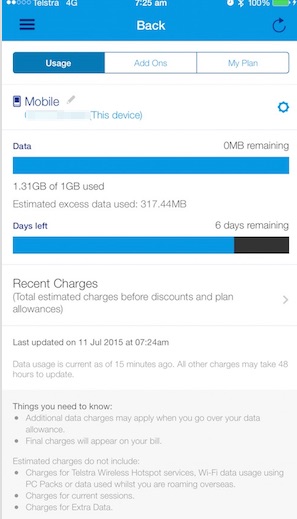
 This month, I found myself nearing my data limit on my mobile phone. Just as a aside, this was mainly due to unexpected data usage I have incurred by looking at my photos, after I had upgraded to iCloud Photo Library. Every time I want to view a photo when I am off my WiFi, it is 'pulling the photo down' from my iCloud and using a bit of my mobile data. As a consequence I am now avoiding looking at photos on my iPhone when I am out and about - unless I absolutely have to. In the past when I have neared my data limit, I have purchased a 'Data Pack' from Telstra for extra data, which I have been able to do very easily from my Telstra 24x7 App. I am then only charged for the days that I use this Data Pack, so it has never cost very much. The only thing was that I had to remember to 'turn off' this data pack at the start of the next month, to avoid ongoing charges. Well, I was excited to see that Telstra has made a change to how it handles excess data usage on my post-paid mobile account. When I chose the option 'Add-Ons' option in my Telstra 24x7 app, I got the below message on my screen - telling me that Data Packs are no longer available. Instead Telstra has a new service called Extra Data. 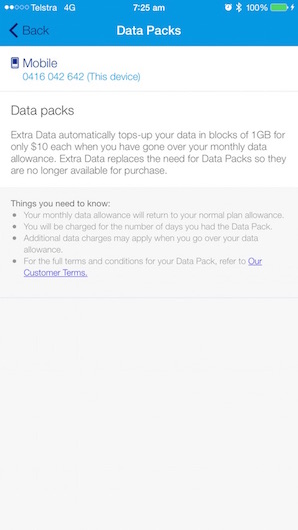 Great (or so I thought) - all sorted, no need to do anything. I must have 'missed the memo' when Telstra announced this new service/feature. (Did anyone else see it?) Apparently, it came in on May 12th 2015. The message that I got indicated that, as soon as I exceeded my data limit, I could rest assured that the 'Extra Data' that Telstra now offers would kick in, saving me from excess data charges. The screen said nothing about having to activate this new feature - it appeared in would just happen seamlessly. Well, maybe not! Today, I went to my Telstra 24x7 app to check how much phone credit I still had available to me for the month. To my shock, it showed that I had over 300MB of excess data usage! I tapped on the Add Ons option at the top of the screen again (like I had before I had exceeded my limit), only to find on the next screen that the 'Extra Data' feature was showing as 'Inactive' (see below).
So, I have NOW activated this feature using the Activate button shown.
But the big question is now whether I am going to get a large excess data charge on my next bill. Here's hoping the Telstra billing system is smart enough to recognise that this 'Extra Data' feature has been activated on my account during the billing month, and therefore wipe any 'Excess Data' charge. Stay tuned - I'll let you know when I get my bill later this month! For those of you interested in ensuring you have activated this feature on you Telstra mobile plan, here is the relevant page from the Telstra website.
0 Comments
 This week, my little Macbook Air gave me a message that it was full. It only has 128GB of hard drive storage, so I need to be very careful about what I store on that device.
When I looked at what was taking up a significant chunk of my storage, I found that one of the main culprits was my Dropbox folders and files. I love my Dropbox for sharing files between my devices, but I do not need the put ALL Dropbox folders on my Macbook Air. I only need my work folders, and even then I only need a selection of these folders. It's very easy to do - as long as your Dropbox folders are well organised. This iTandCoffee handy hint tells you how to go about selecting what Dropbox folders to sync with hour computer. The hint is available to iTandCoffee Club members to view at any time. Not yet a member? Why not join today for unlimited access to great tips and hints like this from iTandCoffee. Related Articles and Handy Hints (Note. Handy Hints can only be viewed by iTandCoffee Club members. Join today! All other articles are free to all readers.)  I know that, for many people, iCloud is one of the glorious mysteries of the Apple world, with many people that I see afraid to turn it on - or perhaps, having turned it on, don't understand what it does.
iCloud is a great service provided by Apple, and is worth understanding better - especially if you value the content of your iPhone or iPad and don't want to lose this content if something happens to your device. Why not attend the 'Introduction to iCloud' class at iTandCoffee to find out more about iCloud, what it can do for you and how to ensure the information you have stored in your iCloud is secure Click/tap here for details of dates and times for this class. 6/7/2015 0 Comments So many ways to keep in touch from the other side of the world using your iPad and iPhone These days, travelling is made so easy by the availability of WiFi in so many places that you stay.
This wonderful technology allows you to feel like you are so close to those you have left at home - even though you are on the other side of the world. You can be iMessage-ing, FaceTime-ing, Facebook-ing, emailing, sharing your photos on a Shared iCloud Stream. Phone access is also available at a relatively low cost. While many might see this as a big interruption to a peaceful time away, for me this was a blessing during a recent overseas trip with my husband, allowing me to have confidence that my kids back home would be able to contact me if necessary. It helped us diagnose my 16 year old son's broken hand (which he showed us on Facebook) and help our 11 year old with his homework when he needed us. Are you interested in finding out more about how to use your technology to keep in touch while travelling overseas? Why not attend the 'Travelling with your iPad and iPhone' class at iTandCoffee Check the below link for details of when this class is next running,  Here's one more thing I love about Evernote.
On my Mac, I use something called the Evernote Web Clipper for Safari. This fantastic little tool sits at the top of my Safari screen, right next to my Search/Address field. It allows me to grab all or part of a web page and save it directly to my Evernote. The page's contents can be saved as an editable note, or as a screen shot! I can even save just part of the page, or choose to save an ad-free, uncluttered version of the page. So many options. This is fantastic for saving away important articles, recipes, tips and hints, and much more. Find out about this great feature of Evernote at the iTandCoffee class Introduction to Evernote - Organising all the information in your daily life! Our July class is filling fast. Book Now!  You may have noticed on Wednesday (1/7/15) that a little red 1 appeared on your Settings app on your iPhone or iPad. Or your device may have popped up with a Software Update notification in the middle of the screen, telling you that iOS 8.4 is available to install. 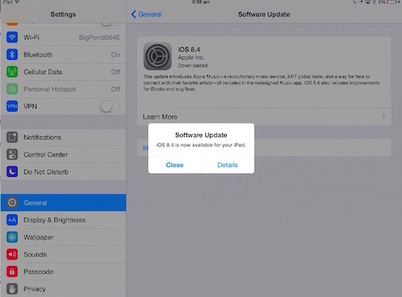 For two of my devices, there is not yet any indication of the update. But, if I go to Settings -> General -> Software Update, I can see that the update is there - ready and waiting (and, in one case, in the process of downloading). 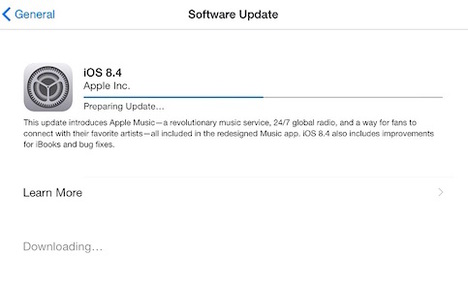  So, what's in iOS 8.4 and should you download it? Apple Music iOS 8.4 adds a major new service from Apple, called Apple Music. The are numerous online articles about this new service, some of which are listed below, for those who want to find out more about this new service from Apple. I have signed up for the 3 month trial, so will report back on my findings!
Security Updates Importantly, iOS 8.4 also includes several security updates to patch some 'gaps' in device security, especially on some older devices. Here's Apple's article with specifics of these security updates. Should you install iOS 8?
I would recommend proceeding with the install of iOS 8.4. Even if you are not so interested in Apple Music, it is important to ensure that security updates are applied to your device. If you need any assistance with performing this update, contact iTandCoffee on 1300 885 420. 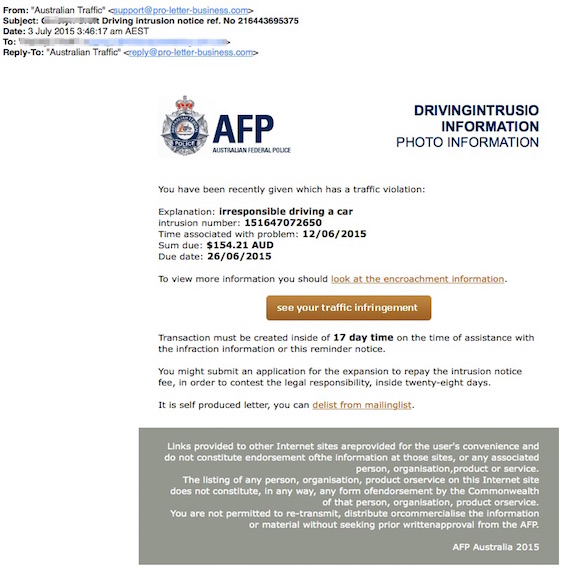 A friend has just forwarded me this email, which she received today.
It's very obvious that it is a scam, as it has terrible grammar and spelling. Even the heading on the right-hand side says DRIVINGINTRUSIO! And the Explanation is is irresponsible driving a car. It's really quite funny! Funny as it is in this case, beware of any email that tries to get you to click on a link, no matter who it is from! (Of course, the iTandCoffee newsletters are an exception to this rule!) Even I get caught out sometimes, wondering why something on my iPhone or iPad is not working as I expect it to. As an example, I was out and about, and wanted to show a friend some furniture that I had been looking at for the first iTandCoffee shop (opening in August 2015 - more on that in coming weeks). I had 'pinned' various website images to my Pinterest board during days of online searching for ideas. For those of you who don't know, Pinterest is a great tool for creating a visual index/reference to all sorts of images and information that you find on the internet, or that you upload from your from your own photos. Great for holiday planning, renovation ideas, recipes etc. 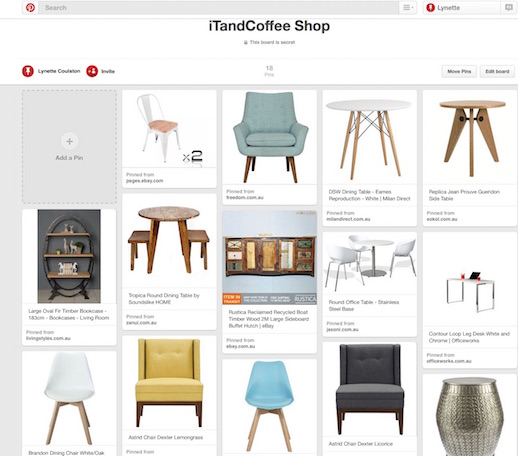 When I opened my Pinterest app while at this friend's house, I could not see my 'boards'. Very frustrating! I thought that maybe I had logged into a different Pinterest account on my iPhone to that which I was using on my computer, and figured I would just have to sort it out later! Of course, I had a 'duh' moment a bit later that day, when it dawned on me what what preventing my boards from showing. I had turned off my Cellular Data for Pinterest (and many other apps) when overseas recently, so I was only able to access my 'boards' when I was Wi-Fi, and not when I was out and about on 3G/4G. This was easily fixed by going to Settings -> Cellular (or Settings -> Mobile for some devices). The list of apps that would like to use Cellular data is shown in the bottom part of the screen. By turning my Pinterest app to on, I will will now be able to view my ideas when on the go, using my cellular data. (But just be sure you have enough Cellular Data to support apps like this before you turn it on. Some apps - are very data hungry and can use up your data allowance before you know it!) Related Handy Hint (for iTandCoffee Club members)
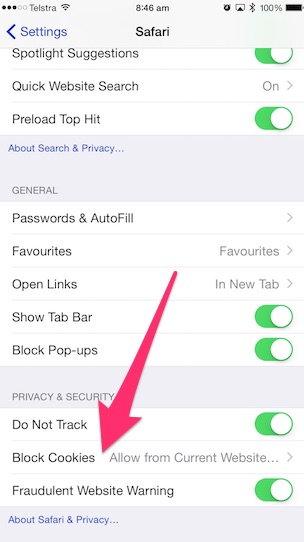
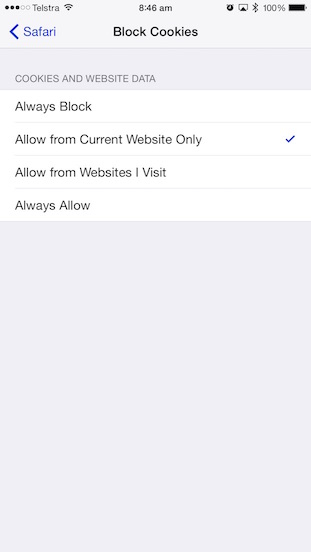
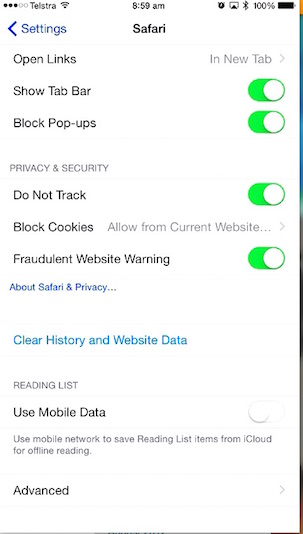
 Have you ever seen a message on your iPad, iPhone or computer advising you that a website wants to store 'Cookies' on your device? What are these things called 'Cookies'? Cookies are small files saved to your device, holding a bit of data relating to you and the website you have visited. For example, your name, address and email address details that you entered for that website may be saved as a Cookie for that website, so that the same information can be filled in next time you visit the website. When you save your login details for a website by ticking a 'remember me' box, a cookie will be created on your device. Cookies are not the only things that websites save to your device. Some websites save 'Website Data' to your device - data that tracks what you looked at (for example, that chair that you were looking at buying, or that hotel you were looking at), then re-uses that data next time you visit. Depending on your settings, this saved 'Website Data' may then be shared with other, so that tailored ads can be 'served' to you based on your previous browsing history Control whether your iPad and iPhone store and use Cookies and Website Data You have control over whether websites are allowed to store cookies and website data while you browse, and over what websites can use those your website data. This is done in Settings->Safari->Block Cookies.
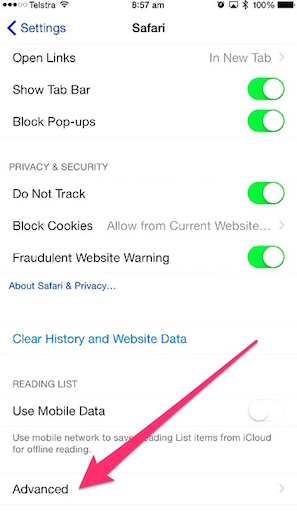
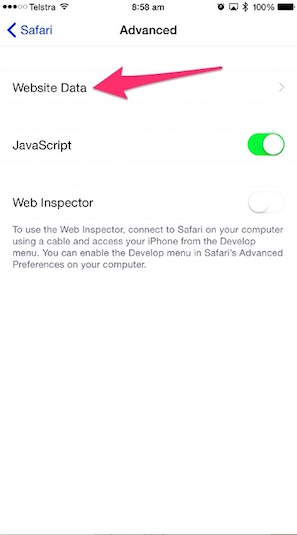
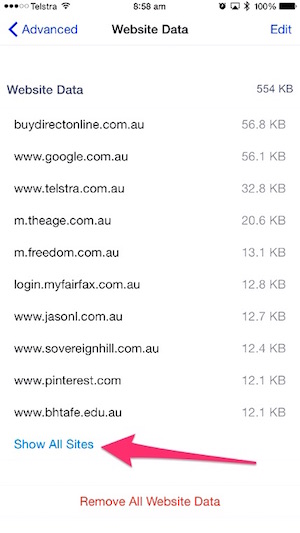
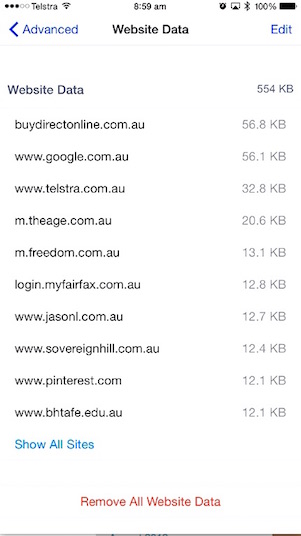
If you don't want to store ANY Cookies or Website Data, choose Always Block. But just be aware that some sites will not operate without the use of cookies. And you will never be able to 'autofill' fields for websites based on data you have previously entered. To stop Website Data being shared with other websites - in particular, to avoid those ads that seem to follow you wherever you go - select Allow from Current Website Only. I would never choose the Always Allow, as this provides an 'open slather' for websites to use the data stored by other websites How do I know what websites are storing data on my device? You can view the list of the websites that store data on your device, and how much data each of these websites is storing. You can even delete the website data for specific sites - especially those that keep 'serving' their ads to you, as if they are stalking as you browse! Go to Settings -> Safari -> Advanced -> Website Data. The sites that store data are listed in size order, with only top 10 shown initially. Tap on Show All Sites to see the full list of websites saving data to your device.
How do I delete the saved Website Data? To delete the website data for individual sites, tap Edit at top right (while in the Settings -> Safari -> Advanced -> Website Data option) then tap the red left-hand circle to delete saved data for a specific website. Or, you can choose to Remove All Website Data (which is shown at the bottom of that screen), to start a clean slate!
Alternatively, to clear all cookies, website data AND History, choose the option Settings ->Safari -> Clear History and Website Data. This will clear out the list of websites that you have visited in the past year (or since you last did such a clear). Related Articles (for iTandCoffee Club members)
Below are some other previously published handy hints about the Safari and web browsing on your iPad and iPhone. An iTandCoffee Club membership is required to view these past Handy Hints. Not yet a member? Why not join today - see here for details!
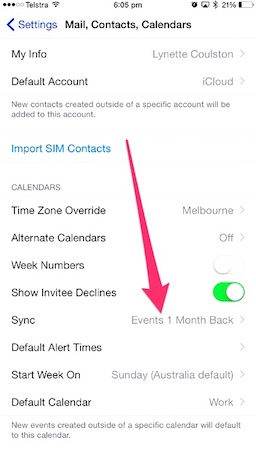
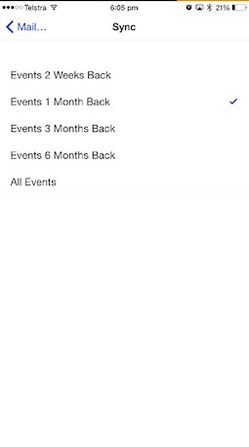
Answer: This is because your device is only downloading a limited amount of Calendar data from your iCloud (or other Mail) account. Limiting the amount of Calendar data can help save space on your mobile device. If you want to see more calendar data than you are seeing, this can be sorted very quickly by visiting Settings -> Mail, Contacts, Calendars. Go to the Calendars section towards the bottom of the Mail, Contacts, Calendars set of options, and tap on the Sync option. Then choose how much calendar data you want to see on your iPhone (or iPad). You have the choice to see all your calendar data, or to restrict the calendar data sync'd to your i-Device to between 2 weeks' and 6 months' worth of data.  Client Question: "Is it correct that about a month after I have attended something, it seems to no longer appear in my iPhone Calendar/diary? I find this frustrating as I sometimes need to look back at what I have done when and check up on dates etc."
Related Articles (for iTandCoffee Club members)
Below are some other previously published handy hints about the Calendar App. An iTandCoffee Club membership is required to view these past Handy Hints. Not yet a member? Why not join today!
|
What's on at iTandCoffee ?Below is our list of videos, classes and other events that are coming up soon.
Videos shown are offered for eligible members of the iTandCoffee Club. If you have questions, why not join fun and informative 'user group' meetings, held once a month. All iTandCoffee classes are run as online classes (using Zoom), which means you can attend from anywhere. |



27 Sycamore St, Camberwell, Victoria Australia
Call 1300 885 420
to book an appointment or class, or to enquire about our services and products

|
SENIORS CARD WELCOME HERE:
Seniors Card holders qualify for a 10% discount on all classes booked and paid for online (excludes PTT sessions and classes already discounted during COVID-19 crisis). To activate the discount at the time of booking, select Redeem Coupon or Gift Certificate and enter 10OFFSEN before selecting Pay Now. |

© 2012-2024 iTandCoffee Pty Ltd. All rights reserved ACN: 606 340 434