Call 1300 885 420 or +61 444 532 161
iTandCoffee | Patient help with your personal and business technology
  • Home
  • About
    • About iTandCoffee
    • In the media
    • Testimonials >
      • Testimonials 2020-21
      • Testimonials 2019
      • Testimonials 2018
    • Privacy Policy
    • Other Policies
    • Prices
  • Classes
    • What's On
  • Appointments
  • Books | Videos | Tips
    • Books
    • Videos
    • Blog
    • Newsletter
    • Tips Library
  • Gift Vouchers
  • iTandCoffee Club
    • Members Area
    • About the Club
    • Membership Options
  • Store
  • Contact
  • Home
  • About
    • About iTandCoffee
    • In the media
    • Testimonials >
      • Testimonials 2020-21
      • Testimonials 2019
      • Testimonials 2018
    • Privacy Policy
    • Other Policies
    • Prices
  • Classes
    • What's On
  • Appointments
  • Books | Videos | Tips
    • Books
    • Videos
    • Blog
    • Newsletter
    • Tips Library
  • Gift Vouchers
  • iTandCoffee Club
    • Members Area
    • About the Club
    • Membership Options
  • Store
  • Contact
Search by typing & pressing enter

YOUR CART

Tips, Tricks and News 
about all sorts of technology in your life!

13/11/2014 1 Comment

Some warnings about using Wi-Fi when travelling - even Hotel Wi-Fi

One of the regular classes that iTandCoffee runs is called 'Travel with your iPhone and iPad' - but it really covers the topic of travelling with any internet-enabled device and phone.

An area of which I find that most people I see, many of whom are frequent travellers, are totally unaware of the risks of using 'free' and even 'hotel' WiFi when they travel.

Below are a few articles that I have scooped recently on this very topic - definitely worth a read if you are planning trip or if you travel for business.  In particular, the article about the 'Darkhotel' malware is worth checking out if you travel and use hotel WiFi - which you may have previously considered quite safe!
Darkhotel malware targets travelling executives: report | theage.com.au
How do I know if a Wi-Fi hotspot is safe
Do you trust public Wi-Fi? | theage.com.au
Why You Should Start Using a VPN (and How to Choose the Best One for Your Needs)

Some further articles relevant to travel

How to optimise broadband while on holiday - Macworld Australia
How to avoid data roaming charges on iPhone while abroad
The ultimate travel accessory
Five tips to make internet banking safer - Macworld Australia
1 Comment

12/11/2014 0 Comments

Notifications not working properly since upgrade to iOS 8

Picture
I'm not sure if it is just my phone that is impacted by this issue, but since I upgraded my iPhone to iOS 8, I have not been getting Notification alerts for certain apps that previously gave me Notification alerts!

I noticed this when my son told me that I had missed some important information this week from the primary school he attends, and that he had been told that I should have seen an alert from the Skoolbag app (a fantastic app that his school uses to notify parents of school-related matters - reminders, newsletters, notices).  

So I checked my settings in Settings -> Notifications for this app and they were all correct - showing that I should have been getting Alert notifications all along. 

My clever 11yo son turned off the Allow Notifications setting for the Skoolbag app, and then turned it back on.  This immediately caused the latest alert to pop up.

So it might be worth checking if you are perhaps missing important notifications from any of your Apps since you upgraded.  I'll certainly be checking all mine by turning the Allow Notifications off then back on for the important ones.


0 Comments

12/11/2014 0 Comments

Some unique ways of using your iPhone's (or iPad's) camera!

I don't normally watch videos like this one that I saw posted by a friend on Facebook today.  But, it mentioned smartphone technology, so curiosity got the better of me!

I absolutely LOVE the ideas that it includes - very novel and definitely worth sharing with my sons (in the hope that they haven't thought of these nifty tricks already)!

The makers of this video provide the following ideas for iPhone camera uses and home-made accessories that I can guarantee you won't have thought of:
  • Use your panaramic feature to 'clone a friend'
  • Take a 'pano drive-by' for a great effect
  • Use binoculars or telescope for great zoom effect
  • A drop of water on the lens gives you macro lens
  • Use foil car windscreen sunshade as a reflector for better lighting for your photos
  • Make a tripod from cardboard to take advantage of the new 'timer' feature of iOS 8
  • Or use your headphones as your camera shutter
  • Take underwater photos using a glass!

Watch the video and be inspired!
0 Comments

12/11/2014 0 Comments

Eleven ways to show your iPad or iPhone on a big screen

This article gives a really good summary of the different ways that you can get your iPad screen displayed on an overhead projector or, as I do when I run iTandCoffee classes from iTandCoffee-central, on my big TV screen and a large HDMI-enabled display monitor.
10 Ways to Show Your iPad on a Projector Screen
For, me, I use the combination of my Apple TV with my big TV, my Apple TV with a big display screen, or my Macbook Air  running an app called Air Server (where my Macbook Air is plugged into either the TV or the projector using the relevant adaptor).  This allows me to wander around while I mirror the contents of my iPad's (or iPhone's) screen up onto the big screen/s - without being hampered by any wires.

Air Server on my Mac turns my Mac into a Airplay device - just like having an Apple TV connected to a television.  This means that any Apple mobile device on the same WiFi network as my Mac will see this Mac is the list of available Airplay devices.

I have used Air Server for years now and can highly recommend it!

Yosemite brings an eleventh option for projecting your iPad or iPhone screen

Yosemite has brought a new option to this list for projecting your iPad's or iPhone's screen onto your Mac - and even allows you to record whatever is happening on your iPad's screen onto your Mac.

Read about this new feature of iOS 8 and Yosemite - one that uses Quicktime Player 10.4 on your upgraded Mac.  I'll be going into more details about this great new feature in a future blog post!
TidBITS: How to Capture iOS Device Video in Yosemite
0 Comments

12/11/2014 0 Comments

Have you been finding the iPhone 6 hard to get?

If you have been wanting to get an iPhone 6, but finding that they are very hard to come by, check out this article scooped (on the iTandCoffee Scoop.it page) today from The Age, describing that this shortage may soon be over.

Retailers promise iPhone 6 stock shortage coming to an end | theage.com.au
0 Comments

10/11/2014 0 Comments

This fortnight's Handy Hint Newsletter is now available (Nov 2014, No. 1)

Picture

This fortnight's newsletter in summary ...

This week's Handy Hints
  • For iPad and iPhone users: Where is the 'caps lock' on the iOS keyboard
  • For Mac users: Merging PDF documents on a Mac - it's so easy! 
App News
  • Hot Off the Presses: Great News about Microsoft Office for iPad and iPhone
  • A couple of Apps I love - one replaces my Calendar, and the other I use for transferring photos to/from i-Devices
  • Are you finding it hard to control your 'swipe' in Mail iOS 8?
Answers to some client questions:
  • Why is my non-junk mail suddenly junk?
  • Is there a way to monitor and manage the kid's internet usage?
  • I can't see the photos from my iPad when I plug it in to my computer! Where are they?
  • Is it time to update to iOS 8 yet?
A couple of other great Mac tips and tricks:
  • How to get back the Dropbox context menu options in Yosemite's Finder
  • How to enable 'right-click' on your Mac - and get heaps of extra options and functions you didn't know existed! 
  • Just one of the many things I love about the new  OS X Yosemite!
This week's 'Scam Watch'
  • Beware of emails from 'Bunnings' and 'Apple'
And finally ...
  • Telstra nearly made my head explode this week!
Read it Now!

(Important Note: This newsletter is available to anyone until November 22nd.  After that, access will be restricted to iTandCoffee Club members only.  Find out more about the iTandCoffee Club.)
0 Comments

9/11/2014 0 Comments

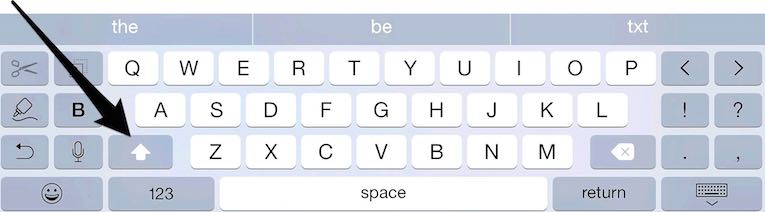
Have you found the 'caps lock' on your iPad and iPhone?

Handy Hint of the week - 8/11/14

I know that this hint will be far too basic for many people.  But for those who are new to the world of iPad and iPhone, and especially those who are less familiar with keyboards in general, I know this stuff is not so obvious.

Please note. Free access to this Handy Hint has now expired - it is now only available to iTandCoffee Club Members.  

If you are a member, click here to learn about the Caps Lock on your iPad and iPhone
Picture
The keyboard on my new iPhone 6 plus! Look at all the extra keys! Shift key indicated by the arrow.

0 Comments

9/11/2014 0 Comments

A couple of apps I love ...

A great Calendar app for iPhone

Picture
This App was my 'find' of the week.

I saw it on another app, Apps Gone Free (which gives you a daily list of apps that are free for the day), and downloaded it to give it a try.

The app  is called Week Calendar (by WeekCal B.V). 

One of my biggest gripes with the Calendar app on my iPhone (since iOS 7) is that it doesn't give me a good view of my week's calendar.   

This is what I loved about Week Cal.  You can see a sample of my iPhone calendar on the right.  I now use Week Cal instead of the standard Calendar App on my iPhone.

Check out further details of this app here.

Of course, this is not the only good third party Calendar app available.  Here is an article from August 2014 that I 'scooped' bat offers a review of the 'best' calendar apps.

Picture
Best calendar apps for iPhone: For when the built-in calendar app isn't enough

Another one I love - Transfer Pro

Picture
Transfer Pro is an app that allows you to transfer photos between you computer and your iPhone/iPad really easily, without needing to use iTunes.  

Check out further details about this app here.

Here's an article published this week that I scooped about Transfer Pro.

How I Transferred 12,000 Photos From Mac -> iPad Without The Photos App | iPad Insight
0 Comments

7/11/2014 0 Comments

Great news about Microsoft Office for iPad and iPhone

Now you are talking Microsoft!

I have not even attempted to use the new MS Word, Excel and Powerpoint on my iPad or iPhone because I just didn't want to pay a yearly subscription fee to use them.

With other free or cheaper options available to me, I just couldn't justify the cost.

Well, now I will definitely be looking to make use of these Microsoft products on my iPad (maybe not so much on my iPhone) - especially for my presentations during classes.

Microsoft has just announced that Microsoft Office for iPad and iPhone will now be FREE!

Read more in this article I have just 'Scooped' from MacWorld.
Microsoft Office for iOS goes free and full-featured on your iPhone - Macworld Australia
0 Comments

7/11/2014 1 Comment

Are you the 'default parent' when it comes to the worrying about the kids and their online safety?  

This recent article in Mamamia really struck a chord with me.  It's author talks about being the 'default parent' in her family.
Are you the default parent?
While it's topic is not really anything to do with technology, it made me think about all the mothers I know socially and that I see as clients who are not only the 'default parent' for education, health, haircuts, homework, projects, etc etc.  They are also the default parent when it comes to worrying about their kids' online safety.

So many younger children now have access to iPads, iPod Touches and even iPhones.  While many parents have been conscious of ensuring that childrens' computer usage is monitored and supervised, this level of attention is often not applied to the childrens' use of these mobile devices.

While the male of the household may often be the one who looks after the general technology 'stuff' in the house, this often does not extend to the area of cybersafety.  The mums who are concerned about this area are often not tech-savvy, and don't know where to turn for help.  It all gets put in the 'too hard' basket.

Even schools seem to lack interest in educating parents about the specifics of how to keep kids safe on devices that the school has mandated that the children must have.

Well mums (and those dad's who may be the 'default parent' when it comes to cybersafety), don't despair!  

On your kids' iPads, iPod Touches and iPhones, it is very easy to set up parental controls that can  keep your kids from gaining access to all sorts of inappropriate and unsavoury content - and that can limit their access to features on these devices that they may not, at their age, really need to use.

Come along to a free morning tea to find out more!


I will be hosting a free morning tea on Wednesday 19th November from 9:30-10:30 at iTandCoffee in Camberwell, where I will show how easy it is to set up these parental controls on your children's Apple device/s.

If you would like to attend this morning tea, please RSVP by Friday 14th November by emailing [email protected] or calling 1300 885 420.
1 Comment
<<Previous
Forward>>

    Receive great articles like this 
    fortnightly to your Inbox

    Picture

    Follow us on Facebook

    iTandCoffee

    Picture

    Join the iTandCoffee Club

    ​for free content, tutorials, videos, classes, offers, discounts and more

    Join our growing community of local and online members who love learning about their technology - through FREE club sessions, remote/phone support, online tips, tricks and tutorials, special members-only offers and discounts, and more. Membership starts at only $49/year.
    Find out more about The iTandCoffee Club

    What's on at iTandCoffee ?

    Below is our list of videos, classes and other events that are coming up soon.
    ​Videos shown are offered for eligible members of the iTandCoffee Club.
    If you have questions, why not join fun and informative 'user group' meetings, held once a month.
    All iTandCoffee classes are run as online classes (using Zoom), which means you can attend from anywhere.

    Archives

    April 2026
    March 2026
    February 2026
    January 2026
    December 2025
    November 2025
    October 2025
    September 2025
    August 2025
    July 2025
    May 2025
    April 2025
    March 2025
    February 2025
    December 2024
    November 2024
    October 2024
    September 2024
    August 2024
    July 2024
    June 2024
    May 2024
    April 2024
    March 2024
    February 2024
    January 2024
    December 2023
    November 2023
    October 2023
    September 2023
    August 2023
    July 2023
    June 2023
    May 2023
    April 2023
    March 2023
    February 2023
    January 2023
    December 2022
    November 2022
    October 2022
    September 2022
    August 2022
    July 2022
    June 2022
    May 2022
    April 2022
    March 2022
    February 2022
    January 2022
    December 2021
    November 2021
    October 2021
    September 2021
    August 2021
    July 2021
    June 2021
    May 2021
    April 2021
    March 2021
    February 2021
    January 2021
    December 2020
    November 2020
    October 2020
    September 2020
    August 2020
    July 2020
    June 2020
    May 2020
    April 2020
    March 2020
    February 2020
    January 2020
    December 2019
    November 2019
    October 2019
    September 2019
    August 2019
    July 2019
    June 2019
    May 2019
    April 2019
    March 2019
    February 2019
    January 2019
    December 2018
    November 2018
    October 2018
    September 2018
    August 2018
    July 2018
    June 2018
    May 2018
    April 2018
    March 2018
    February 2018
    January 2018
    December 2017
    November 2017
    October 2017
    September 2017
    August 2017
    July 2017
    June 2017
    May 2017
    April 2017
    March 2017
    February 2017
    January 2017
    December 2016
    November 2016
    October 2016
    September 2016
    August 2016
    July 2016
    June 2016
    May 2016
    April 2016
    March 2016
    February 2016
    January 2016
    December 2015
    November 2015
    October 2015
    September 2015
    August 2015
    July 2015
    June 2015
    May 2015
    April 2015
    March 2015
    February 2015
    January 2015
    December 2014
    November 2014
    October 2014
    September 2014
    August 2014
    July 2014
    June 2014
    May 2014
    April 2014
    March 2014
    February 2014
    January 2014
    December 2013
    November 2013
    October 2013
    September 2013
    August 2013
    July 2013
    June 2013
    May 2013
    April 2013
    March 2013
    February 2013
    January 2013
    November 2012
    October 2012
    September 2012
    August 2012
    May 2012

    Categories

    All 1800-number Accessibility Accessories Activity Monitor Adobe Adware AI Airdrop Airplay Airpods Alarms Alerts Android Apple Account Apple Id Apple-id Appleid.apple.com Apple Music Apple News Apple Pay Apple Pencil Apple Tv Apple Watch Apps App Specific Passwords App Store App Windows Apss Audio Autolock Automatic-downloadsupdates Automator Backup Backups Battery Be-connected Be-connected Bigpond Big Sur Bitcoin Bitlocker Blockchain Bluetooth Booklet Books Boot Camp Budgetting Business Buying Guide Calendar Camera Canva Captcha Catalina Cellular Data Centrelink Channel 9 Charging ChatGPT Christmas Chrome Classes Client Stories Clipboard Cloud Cloud-storage Cloud-storage Club Club News Colours Com Compass Contacts Continuity Control-center Control Centre Convert Cookies Copilot COVID COVID 19 COVID-19 Cybersafety Datad777f385d3 Data Usage Delete Desktop Dictation Dock Do Not Disturb Downloads Dropbox DVD Education El-capitan Email Emergency Emojii Encryption Entertainment ESIM Ethernet Evernote Excel Facebook Family Family History Files Finance Finder Find My Find My Car Find-my-iDevice Fingerprint Sensor Fonts Force Reboot Forgetting Curve Fraud Free Friday Gift Ideas Gmail Google Google Drive Google Flights Google Photos Google Sheets Government Services Guides Handbrake Handoff Handy Hints Hard-drive-crash HDD Health High Sierra Home Button Homepod Home Screen Hotmail Housekeeping Humour ICloud ICloud Backup ICloud Drive ICloud Family ICloud Photo Library Identity Identity Theft Images Image-to-text IMAP IMessage Imovie Instagram Internet Internet Issues Internet-options Internet-options Ios Ios-11 Ios-11 Ios-12 IOS 13 IOS 14 IOS 15 IOS 16 IOS 17 IOS 18 IOS 26 Ios Photos IPad Ipad-tips Iphone Iphone-12 IPhone 13 IPhone 16 Iphone-8 Iphone8 Iphone Basics Iphone-calendar IPhone Mirroring Iphone Settings Iphone-x Iphonex Ipod Itandcoffee Itandcoffee Club Itandcoffee News Itandcoffee Services Itandcoffee-swap-shop Itandwine Itunes Junk Keyboard Keychain Kids And Technology Kidsandtechnology Lifestyle Lock Screen Mac Mac-basics Mackeeper Mac Mail Mac-mail Mac-monday Macos MacOS 26 MacOS Sequoia Mac Photos Mac-photos Mac Storage Mac Tutorials Mac-videos Magnifier Magsafe Mail Malware Maps Measure Media Medical-id Messages Messenger Microphone Microsoft Microsoft 365 Mobile Banking Mobile Data Mobile-data Mobile Porting Mojave Monterey Motion Mouse Movies Multitasking Music MyGov My-health-record Navigation NBN Netflix Notes Notifications Number Porting Office 365 Onedrive Onenote Online Safety Online-safety Optusnet Os-x Outlook Pages Parental Controls Passwords Paypal PDF Personal Hotspot Phishing Phone Photo Book Photo-books Photos Photos On Mac PLAYLIST Podcasts Popups Powerpoint Preview Printing Privacy Productivity Product Launch Publicity Publicityads57a389ac69 Publisher Purchasing-an-idevice Qa QR Code Quicktime Raise-to-wake Ransomware Reachability Reboot Recommendations Recovery Relay Reminders Remotewipe Repairs Restore Restrictions Rings Rotation-lock Router Safari Safari-favourites Samsung Santa Scam Scam Email Scams Scan Scannable Scanning School-ipad Scoopit Screen Screen-brightness Screensaver Screenshots Screen Time Scrolling Secondhand-devices Security Sell Seniors Seo Services Sessions Settings Share Shared-calendar Shop Shopping Shortcuts Sierra Signature Silent-auction Sim Siri Skype Slideover Slides Slideshow Slideshows Slow-device Slow-mac Smart-tv Sms Snapfish Social Media Socialmedia Software Update Softwareupdate Software Updates Sonoma Sounds Spam Spinning-beachball Split Screen Split View Spotlightsearch Startup Storage Storage Space Streaming Subscriptions Sunrise Switch Symbols Sync System Preferences Task Manager Tasks Task-switcher Taskswitcher Teams Technology Technologyarticles Technologydependency Technology-lifestyle Technology-solutions Technologytips Techsupport Telco Telcos Telstra Telstracomplaint Text Text Replacements Theft The-katering-show Thermomix Thesenior Timemachine Time-to-leave Tio Toys Trackpad Training Videos Transcribe Translate Travel Travel Sim Tripadvisor Troubleshooting Tutorial Tutorials TV Two Factor Authentication Twofactor-authentication Two-step-verification Typing Typing Shortcuts Undo Universal Control Unlock Update Updates Upgrade Uppercase Usage User Group Utilities Ventura Video Video-blog Videos Virus Voice-and-data Voicemail Voice-memos Volume Vpn Wallet Wallpaper Warnings Weather Web Browser Website Weebly Whatsapp Widgets Wi-fi Wi-Fi Wifi Wifi084d04ddac Wifi-calling Windows Windows 10 Windows10 Windows 11 Word Wordpress Worldclock Yosemite Youtube Zoom

    RSS Feed

​​Call  +61 444 532 161  or  1300 885 420

​to book an appointment or class, or to enquire about our services and products


Seniors Card Welcome
SENIORS CARD WELCOME HERE:
Seniors Card holders qualify for a 10%* discount on eligible classes booked and paid for online. 
To activate the discount at the time of booking, select Redeem Coupon or Gift Certificate and enter 10OFFSEN before selecting Pay Now
Seniors can also save $5** on the first full hour of appointments booked online. Enter Coupon Code of 
BASEN5 when booking to receive this discount.
* Some heavily discounted classes are excluded from the 10% class discount offer.
** Where more than one type of discount is available, only one type of discount can be used.

Services
Classes
Event Calendar
Private Appointments
Gift Vouchers
Remote support
​Business Services
​Help for families

Online Content
​Newsletter
User Guides
Video tutorials/classes
Tips and Hints
​Blog
iTandCoffee Club
About the Club
Free Club Sessions
Sign In/View Account
Members Area
Prices/Policies
Prices
Privacy
Cancellations, Refunds, Returns
About iTandCoffee
Home
About

​Contact us
Testimonials
In the press

Picture
​© 2012-2026 iTandCoffee Pty Ltd. All rights reserved  ACN: 606 340 434