
 Client Jeff T sent the following email to iTandCoffee recently: "A friend's daughter had her bank account hacked when someone stole her mobile phone number. Yes, her number: not her phone. The first she knew of it was her phone stopped working and then an email message from her bank saying her account was now linked to a Samsung: she had an iPhone. Apparently they transferred the number to a new SIM and then used their phone to tap an ATM with phone access and withdrew $400. Optus and Comm Bank confirmed that this is what happened." The theft of mobile numbers - which can happen if someone gathers enough information about you (via 'snail' mail theft, social engineering, or other means) to set up a new SIM in your name and transfer your mobile number to that SIM - has been reported at various times in the press over the last 12 months or so.
It is known as 'mobile number porting', and can happen when some is the victim of identity theft.
Can I request a 'password reset' text from my bank? I must say that I did check my own bank account after receiving Jeff's email, curious to see if my bank (Commbank) would text a password reset link to my mobile number if I chose their 'forgotten password' option. Fortunately, Commbank requires you to enter 2 pieces of information before it will send you a message with a 'password reset' link. You must provide a card number and your ATM PIN. If your PIN is easily guessed (for example, it is your birthday, anniversary, or your postcode), then you could be in trouble. If you can't provide the required two pieces of information, then you would have to call the Commbank call centre or visit a branch - and presumably convince the person on the other end of your identity. What does your own bank require? Can you request that a password reset link be sent to your mobile? Do any of your online accounts send a 'password reset' link (or a password) to your mobile number? It is worth definitely worth considering what might happen to all of your online accounts if someone was able to steal your mobile number. I know that Telstra will send you a text with your Bigpond account password, as long as you provide a few identity details - identity details that are no so difficult to obtain if you are a scammer! The person who steals your mobile number could then log in to your Bigpond email account. Once there, they could do a heap of password resets for your online accounts that use that email address - given that many online accounts will let you choose a 'forgotten password' option, and send an email with a link for resetting the account password. Personally, I never use my Telstra Bigpond email address to register for any online accounts. That way, if someone was to get access to my Bigpond account, it would not be much use to them. For all my other online accounts, I have 'two step verification' in place (or two-factor authentication) as an extra 'layer' of protection'. Here's an article from iTandCoffee about this extra security measure: The issue with two-step-verirfication if your mobile number is stolen If your mobile number is stolen, you should consider which of your accounts has 'two step verification' in place - where a text is sent to your mobile with a code to enter after you have attempted to log in with your username/email address and password. While two step verification (or two factor authentication, if offered) is a 'must do' on all online accounts, it is of little value if your mobile number is stolen - especially if you have used the same password on lots of online accounts, and the thief/hacker has discovered that password. You will no longer receive that 'protective' number code - the thief/hacker will. Act quickly If ever you suspect you are the victim of the theft of your mobile number or any online account has been breached, act as quickly as you can to change passwords and contact your Telco and Bank. If you need help with password resets (or any other security matters), iTandCoffee in Glen Iris can help. Just call 1300 885 420 to make an appointment. How was Jeff's friend hacked? For the example described above by Jeff T, I would wonder if the person involved had been caught out (perhaps without even realising it) by a phishing email, and given away her online banking details or other identity details, including her mobile phone number. Or she may have had her email and password stolen from some website that had been hacked, and may have used the same password for other online accounts (a big no-no!). She may have had an easy-to-guess PIN for her bank account. Perhaps they had obtained personal information about her from her social media world; perhaps they had stolen statements or other letters from her letterbox. While phone number porting scams are scary, I am sure that the scammers would not have been able to gain access to the victim's bank account simply by having a SIM with her mobile number.
1 Comment
 You may have seen reports in the press last week about a lady in Melbourne who was scammed out of $46,000 when she fell for a phone scam. Details are reported on the Victoria Police website: Police warning re iTunes card scam. Here is an extract from the article. "The Hawthorn woman was contacted by an overseas scammer by phone earlier this month, who claimed to work for a major Telco. Unfortunately, a client of iTandCoffee has also been very recently caught by this scam.
He was lucky that a staff member at the local Woolworths alerted him to the potential scam when he went to purchase $720 worth of iTunes cards. Sadly, the shame and embarrassment this scam causes its victims can even lead them to not report what has happened to them. In the case of our client, he had taken several days to call iTandCoffee. The scammers had set up remote access to his computer so had been able to monitor what he was doing and access all his files during those days. Please make sure you warn those you know who might be vulnerable. These scammers really can make those who don't understand technology believe what they are saying. iTandCoffee can help if you (or someone you know) are caught out by this or other scams. Call 1300 885 420 or email enquiries@itandcoffee.com.au. 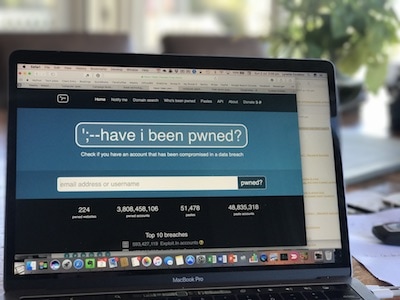 I was reading the Innovic monthly newsletter this week, and it included a handy link that I thought readers of our own iTandCoffee newsletter might appreciate.
It is a link to a site that allows you to check if your email address (or username) has been found on a list of details stolen from various well-known websites - for example, Dropbox, LinkedIn, Adobe, Yahoo. This various websites were compromised at different times over the past few years, and email addresses, passwords and other details were stolen. I found my own email address was listed twice on the 'hacked' list - for LinkedIn and for Dropbox. I had already changed my password for these sites, but it was unsettling to see that I was 'on the list'. Its worth checking your own email address, and then ensuring that you have changed your password details for any site for which you DO appear on the list. Here is a link to the website:  Just in case you missed all the reports in the press last week, thousands of Windows computers worldwide were impacted by a ransomware attack.
The ransomware was able to infect computers on a network when any user clicked on a suspect link or downloaded an infected file that they received in an email. Here is as article about this attack: WannaCrypt: what you need to know about the global ransomware cyber attack An important thing to note is that the computers that were impacted were those that were not running the latest update to Windows. (Mac computers were not impacted by this attack, nor were Apple mobile devices or Android devices.) Microsoft had already patched the vulnerability that the attackers took advantage of, and released the security update in March. So anyone whose computer was up to date would have been protected. The big question is: How up to date is your own version of Windows? Are you safe from attacks such as this? It might be time to check, and ensure that you install the latest update - and also check that you have current anti-virus protection from Windows Defender or a third-party product. Contact iTandCoffee on 1300 885 420 if you need to make an appointment for assistance with this.  If you are considering purchasing an iPhone (or other type of smartphone or tablet) online, first read this story.
A long-term client of iTandCoffee visited before Christmas because she was having trouble with her iPhone 6 Plus, one that she had purchased on eBay a couple of months earlier. It had been 'glitchy' ever since she got it - the fingerprint sensor would not work, the mute switch did not mute, 'Selfie' photos had a shadow on them, charging took more than 24 hours and the charge lasted far less than 24 hours. When she came to iTandCoffee, the iPhone was at the point where it would no longer turn on. In looking at the iPhone, there were several things that struck me as strange just viewing the iPhone.
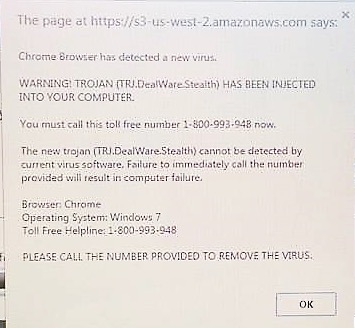
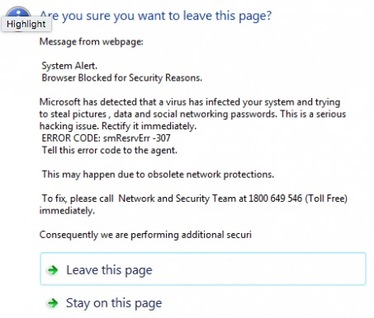
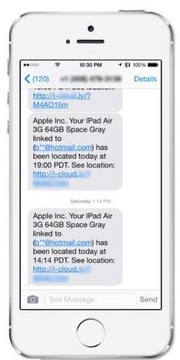
At the time it initially arrived, she did think it strange that it came with with only a UK power adaptor. But she certainly didn't expect it to be a fake. When she subsequently contacted the seller via eBay to complain and ask for her money back, they finally contacted her in return and told her to log into her iCloud account (at appleid.apple.com) and remove the iPhone from the list of devices associated with her iCloud. They said that, once she confirmed she had done this, they would then send her their return address details, so that she could return the phone for a refund. Suspecting she would simply lose the phone and not get a refund if she returned it, she contacted Apple Support, who were very helpful. They looked into the seller and advised that there are lots of complaints about dodgy/fake phones and that the seller. They suggested that the seller most likely wanted the device free of links to iCloud, so that they could simply sell it it another unsuspecting victim when she returned it. So she is now keeping the phone as evidence and will pursue the matter further through Paypal, to see if she can get her money back. For anyone who has a device that they worry may be fake, here is an article that outlines what to look for: 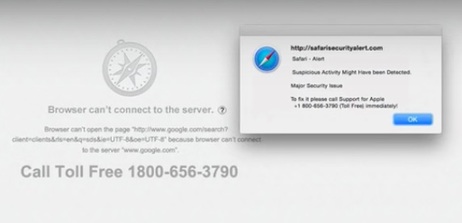 Recently, I published an article about a scam that caught out a young client, and resulted in a charge of over $500 on his credit card and some scammers from India gaining access to his Mac computer. This scam has also impacted THREE iTandCoffee clients during the past fortnight. All of these clients contacted iTandCoffee to say that they had received a strange message on their devices while using their web browser. Two were Mac users, and one was a Windows user. This message told them they had a virus and needed to contact a 1800 number. Here are some images of messages showing variations on the same theme.
In each case, the client's web browser locked up, rendering them unable get rid of the message and go to any other web page.
In two cases, the clients called the 1800 number and allowed the scammers to get onto their computers. Fortunately, they realised they were being scammed when they were asked for credit card details. But the scammers still had access to their computers! Needless to say, these two clients were very distressed when they called iTandCoffee. The first thing we asked them to do was to turn off their internet and shut down the computer. iTandCoffee was then able to subsequently remove offending software that the scammers installed, and the clients are now back up an running. PLEASE DON'T GET CAUGHT BY THIS SCAM ON ANY OF YOUR DEVICES. This type of message can also appear on your iPad or iPhone. You DO NOT have a virus. DO NOT call the 1800 number. The scammers are trying to
Here are a couple of past articles that tell you what to do if your web browser does get locked up by one of these scams.
Need help? If you are concerned you have been caught out by this, or need help to sort unlock your browser, please contact iTandCoffee to make an appointment. We can walk you through what to do over the phone, or in-shop at 34 High Street Glen Iris, Victoria. If you are in Melbourne, we can do a home visit to help sort you out. (Please note that charges apply for all appointments.) 7/8/2016 2 Comments What do you do if your Safari session is 'locked up' by a nasty screen that won't go away?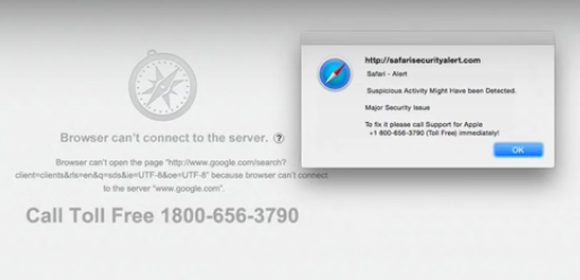 In another recent article on the blog, I told the story of a young man whose Mac Safari session had appeared to be under attack - locking up and preventing him from doing any web browsing.
Even if he closed Safari, even when he restarted his Mac, he could not stop this nasty screen taking over his browsing session. This is a form of Malware, and to stop it occurring, it is necessary to access Safari Preferences and Remove Website Data ... However, how do you get into the Safari preferences if this screen keep taking over and preventing any selection of Safari options? Find out how to resolve this sort of problem in this week's Handy Hint, for iTandCoffee Club Members. 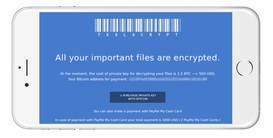 An iTandCoffee client contacted iTandCoffee this week after receiving an extremely concerning message on her iPad. She wrote: "I am sending you a snap shot of my iPad screen showing a pop notice that I have now received twice which renders my Safari inexcessable unless I action the okay option at the bottom, which then brings up some slightly alarming boxes." 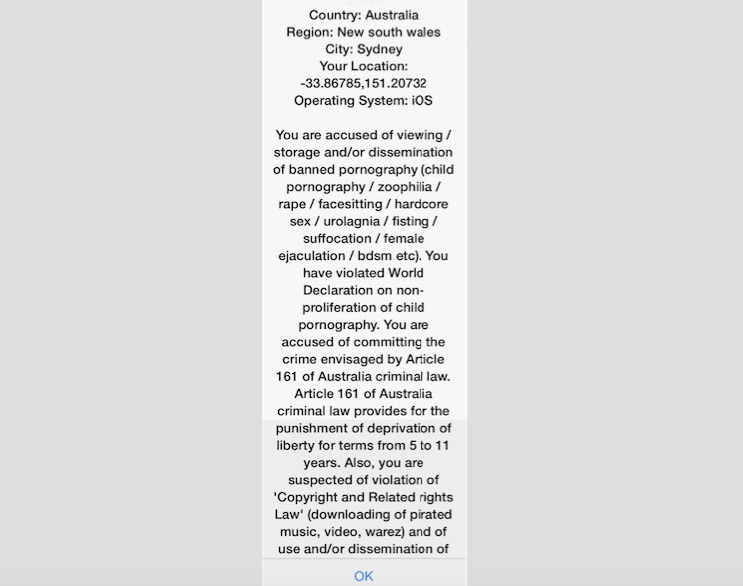 This message is a form of Ransomware, a scam designed to force you to pay money to fraudsters and perhaps even give away your credit card details. If you click OK on a Windows or Android computer, you may find your device has been locked up by a virus, asking you to pay the 'ransom' in order to 'release' your device. In actual fact, all that is required in this case is the removal of the virus - here are articles on how to do this on Android and Windows. Fortunately for this iTandCoffee client, the message came up on her iPad - so clicking OK did not have had any ill effects, other than to give a big fright. (This is just one of the great advantages of Apple devices - scams like this do not work on iPads and iPhones.) But this client was still 'stuck' by the message in Safari, as it seemed to have 'hijacked' her Safari and was stopping her from getting to any other functions in Safari. How to deal with scams that 'lock up' your Safari on your iPad or iPhoneIt is quite easy to resolve such a problem - by resetting your Safari browsing history and website data.
Go to Settings -> Safari and tap on Clear History and Website Data Once you have done this, you will find that you can start up a fresh Safari session that is free of the fraudster's message. 16/7/2015 0 Comments That scam 'Australia Post' email that could easily have caught me out this week! I am currently doing lots of online purchasing for the new iTandCoffee shop, with several of deliveries scheduled for this week and the next few weeks. So, when I received this email today, it would have been so easy to have been fooled by it - as it tells me that I had missed delivery of a parcel. PLEASE be careful of emails like this. They are not from Australia Post - they are scams, and should be deleted immediately. I could be absolutely sure it was a scam by looking at the link's address to see where it was REALLY going to send me if I clicked on it - definitely not Australia Post. Here is a previous blog post on how this scam: Beware of emails saying you have a parcel for collection! And another that tells you how to check the link in an email to see if it is legitimate: How to work out where an email link is really going to take you. If you are ever wondering if such an email is legitimate, but are not confident enough to check the link, call your local Australia Post to check, or forward it to iTandCoffee to get us to check if it is legitimate! Please do not click the link. 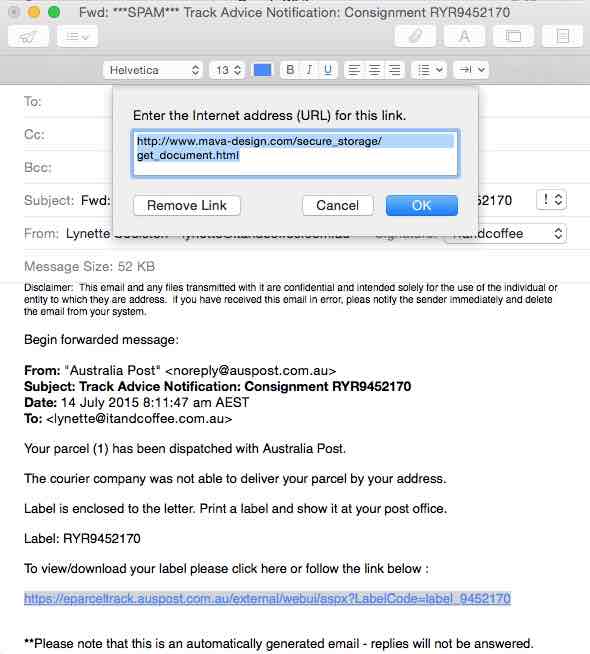
|
What's on at iTandCoffee ?Below is our list of videos, classes and other events that are coming up soon.
Videos shown are offered for eligible members of the iTandCoffee Club. If you have questions, why not join fun and informative 'user group' meetings, held once a month. All iTandCoffee classes are run as online classes (using Zoom), which means you can attend from anywhere. |


27 Sycamore St, Camberwell, Victoria Australia
Call +61 444 532 161 or 1300 885 320
to book an appointment or class, or to enquire about our services and products

|
SENIORS CARD WELCOME HERE:
Seniors Card holders qualify for a 10% discount on all classes booked and paid for online (excludes PTT sessions and classes already discounted during COVID-19 crisis). To activate the discount at the time of booking, select Redeem Coupon or Gift Certificate and enter 10OFFSEN before selecting Pay Now. |

© 2012-2024 iTandCoffee Pty Ltd. All rights reserved ACN: 606 340 434